
In addition to sending documents by post, Bing can also send via Email, Fax and SMS transports.
Click to send documents via Email, or to send via Fax.
SMS Sender ID Register
The SMS Sender ID Register has been established under Part 24B of the Telecommunications Act 1997. The register is intended to help protect recipients from scam messages that impersonate trusted brands or organisations.
From 1 July 2026, SMS or MMS messages sent with a sender identification that is not registered in the SMS Sender ID Register will be labelled as Unverified.
If you wish to send SMS messages using a Sender Label or other sender identification, that sender identification must be registered in the SMS Sender ID Register and you must send those messages using one or more participating telecommunications providers.
Who can apply to register a sender ID?
The following entity types may be approved to apply to register sender identifications:
- An individual.
- A body corporate.
- A corporation sole.
- A body politic.
- A government entity.
- A partnership.
- Any other unincorporated association or body of persons.
- A trust.
- A superannuation fund.
What is required?
To register a sender identification, the entity must demonstrate a valid use case for the sender identification.
An entity with an ABN can apply through a participating originating telecommunications provider, or a partner of one. The person making the request must be listed as an authorised contact for the entity on the Australian Business Register, or otherwise be authorised by the entity, must pass an identification check, and must agree to the Register's terms of use.
Once an application has been made on behalf of an entity, the person making the request will receive instructions from the ACMA about how to access the Register. Once approved by the ACMA, the entity can confirm the registration of the sender identification.
Any cost for registering a sender identification, including any ongoing annual charge, will be advised as part of the registration process.
Once a sender identification is registered, the entity can authorise other participating telecommunications providers to send messages using that sender identification.
An entity without an ABN can only apply through an originating telecommunications provider that is a certified telecommunications provider, or a partner of a certified telecommunications provider. That provider or partner will conduct similar checks. An entity without an ABN will not be able to gain access to the Register.
To register a Sender Label for use with Bing SMS services, contact Bing Customer Service.
Capabilities
- Delayed transmission.
- Configurable From address.
- Replies to Bing or your nominated mobile.
- Failover to email or postal.
- Conditional failover for unaccessed documents.
- Include custom data.
- Short URL for hyperlinked documents.
- Reporting for hosted document access.
- Reporting for replies to Bing.
Prerequisites
In order to use SMS as a document transport you need the following:
- An extractable SMS address in your document.
- A server side SMS template.
- If using a Sender Label or sender identification, registration in the SMS Sender ID Register where required.
SMS Templates
Replies To is who the message appears to be from. When set to No Reply, a Sender Label up to 10 characters must be set, e.g. BANKCORP. In this example the message would appear to come from BANKCORP and the end recipient would be unable to reply. Sender Labels may need to be registered in the SMS Sender ID Register before use. Replies To can also be set to Bing, where any responses can be recorded and reported upon, or set to a nominated mobile number.
Message is the body of the SMS message and can include a mixture of static text and/or variable data.
To create your SMS template contact Bing Customer Service with your requirements.
Variable Data Fields:
Reference, Account ID, Department, Title/Subject, Postal Line1, Postal Line2, Time, Document Hyperlink.
Extracting SMS Addresses
To send to an SMS address you must first include it in your document for extraction. The SMS field looks for sms: and is case insensitive. Data after this marker is extracted and used as the SMS address.
sms:1300 309 800
Ms J Jones
Bing Technologies Pty Ltd
Suite 54, Jones Bay Wharf
26-32 Pirrama Road
Pyrmont NSW 2009
Figure 1.1 shows how the SMS address will appear when successfully extracted.
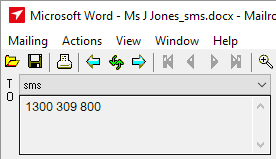
Fig 1.1
Extracted addresses are prioritised in the following order: SMS, Fax, Email, Postal.
If an SMS and a postal address are extracted from the same letter, the SMS address takes priority and will be used as the primary transport method.
Advanced Features
Contact Bing Customer Service for advanced features such as conditional failover and handling of replies.