
Invoicing and Billing
Bing issues tax invoices twice each month, on the 1st and 15th. Each invoice represents mailings lodged within the billing period.
How postal charges are calculated
Postal charges are based on the factors below:
- Mail item type - Small Letter, Large Letter, Parcel, or Postcard.
- Service level - Regular or Priority.
- Print type - black and white or colour.
- Impressions - an impression is one printed side.
- Additional postal services - Registered Post, Tracking, Reply Paid, Returned Mail handling, and international surcharges.
The first impression charge includes the base mail piece cost, including postage, paper, envelope, lodgement, and printing of the first printed side. Any remaining printed sides are charged as extra impressions.
For colour items, additional colour impressions and additional black and white impressions are charged separately. Double-sided printing also affects the physical page count of a mail item and can change the letter format used for billing.
Other delivery methods
If enabled on your account, invoices include other delivery services including email, SMS, BPAY View, fax, and document hosting or archival services.
These services are reported separately from postal items and are charged on a per recipient, per record, per segment, or per page basis depending on the delivery method used.
Sample Tax Invoice
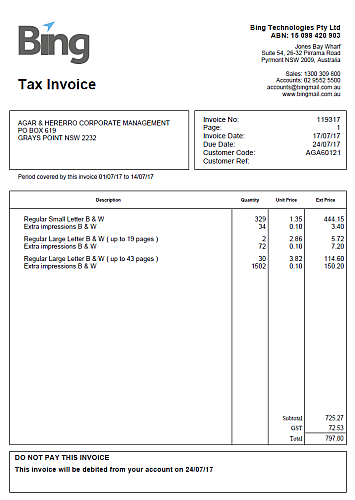
Fig 1. Sample tax invoice format
Department Summary
Department summaries provide a reporting breakdown of activity by department. They are not separate invoices. Any charges shown in the summary are already included in the main invoice for the billing period.
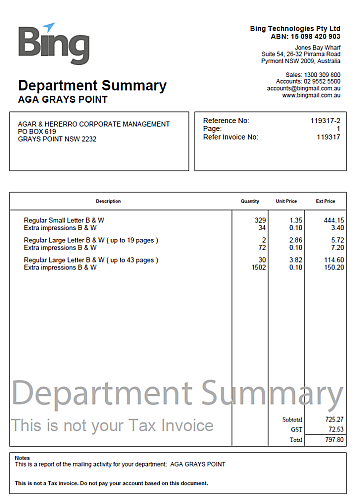
Fig 2. Sample department summary
Note: Department summaries are optional and can be enabled on request. Contact Bing Customer Support if you would like department summaries added to your account.
CSV Mailing Detail Report
On request, Bing emails a CSV file showing a detailed breakdown of the activity included on the invoice. This report helps you reconcile invoice totals back to individual jobs, departments, formats, service types, and delivery methods.

Fig 3. Sample CSV mailing detail report
Note: Contact Bing Customer Support if you would like the invoice mailing detail report enabled for your account.